For salon owners and managers
Salon SEO: 5 Free Google Business Profile Fixes
By The RŌZ Team · Published August 12, 2026 · Updated August 14, 2026
For salon owners and managers
How your salon appears on Google and in AI search starts with clear, current public information.
When someone nearby searches “hair stylist near me” on Google or asks ChatGPT to recommend a salon, your business is being compared before you ever meet the client. The goal of salon SEO is simple: make it easy to see what you do, where you are, why people trust you, and how to book.
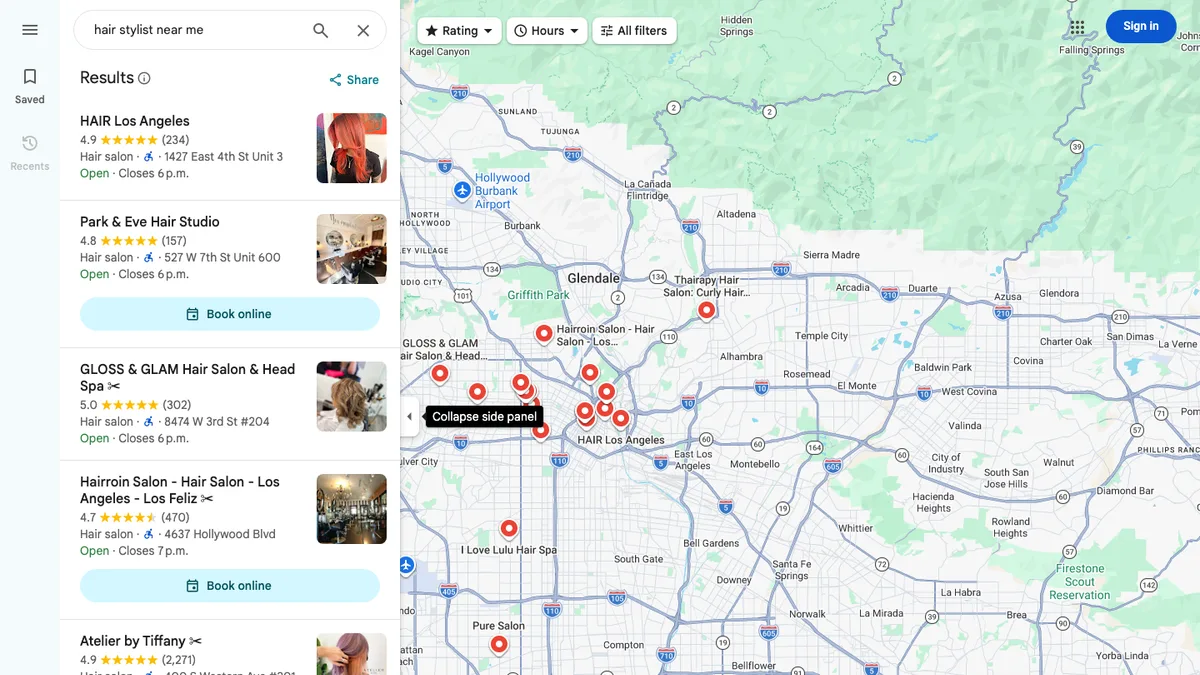
These five checks address profile fields and booking paths Google documents as useful for local discovery. You can complete them yourself for free, using your Google Business Profile and the public pages you already have. No code, SEO software, or technical skills required.
Before the timer starts: You need to be able to edit the salon’s profile. If it has not been claimed or verified, follow Google’s instructions to add or claim the business and verify the Business Profile. Google chooses the available verification method, and completion may not be immediate.
Open your salon profile: Once you have access, sign in to Google Business Profile in another tab with the Google account that manages the salon. Google will take you to the profile you can edit — or ask you to choose one when that account manages more than one business. The five fixes below add up to about 15 minutes.
Fix 1: Choose the right salon categories (2 minutes)
Your category is one of the clearest ways to tell Google what kind of business you run. Google recommends choosing the fewest categories needed to describe your core business accurately, so this is not a place to collect every option that sounds useful.
Click path: Sign in to Google Business Profile → Edit profile → Business category
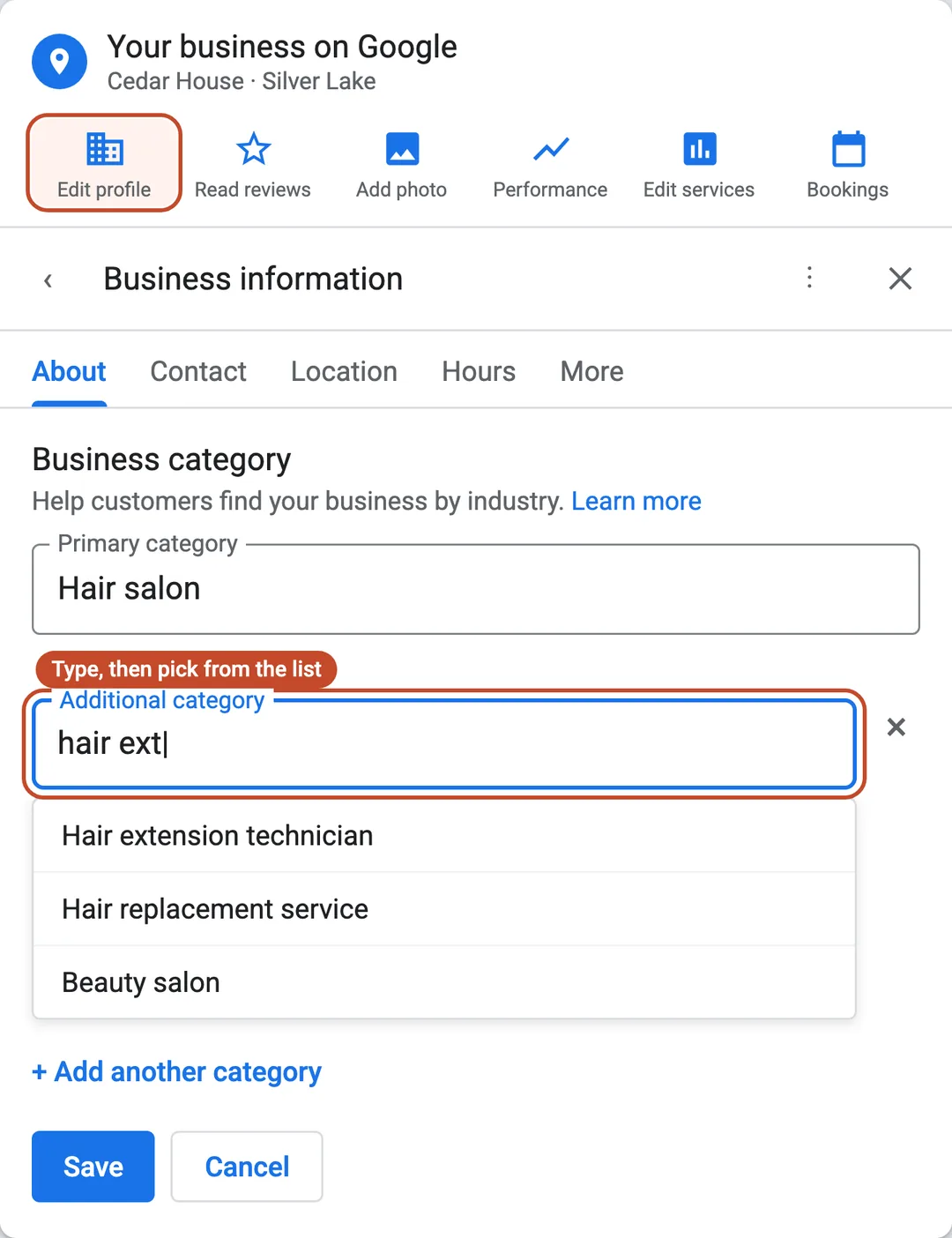
- Choose the category that best describes the main business, such as Hair salon or Hairdresser, depending on the options available to you.
- Add a secondary category only when it describes a meaningful service people can actually book, such as a hair extension specialty.
- Remove categories that are outdated, aspirational, or unrelated to the salon.
Done when: Your primary category describes the business that brings most clients through the door, and every secondary category represents work you currently offer.
Do not add “balayage,” “hair extensions,” a city, or “best salon” to your business name unless those words are part of the name used on your real signage and website. Google requires the profile name to match the business as it is represented in the real world.
Fix 2: Add the salon services people actually search for (3 minutes)
A client is more likely to search for balayage, curly haircut, or hair extensions than the creative name on an internal service menu. Google says a service may be highlighted on your profile when a local customer searches for an offering you provide.
Click path: Sign in to Google Business Profile → Edit services → Add more services
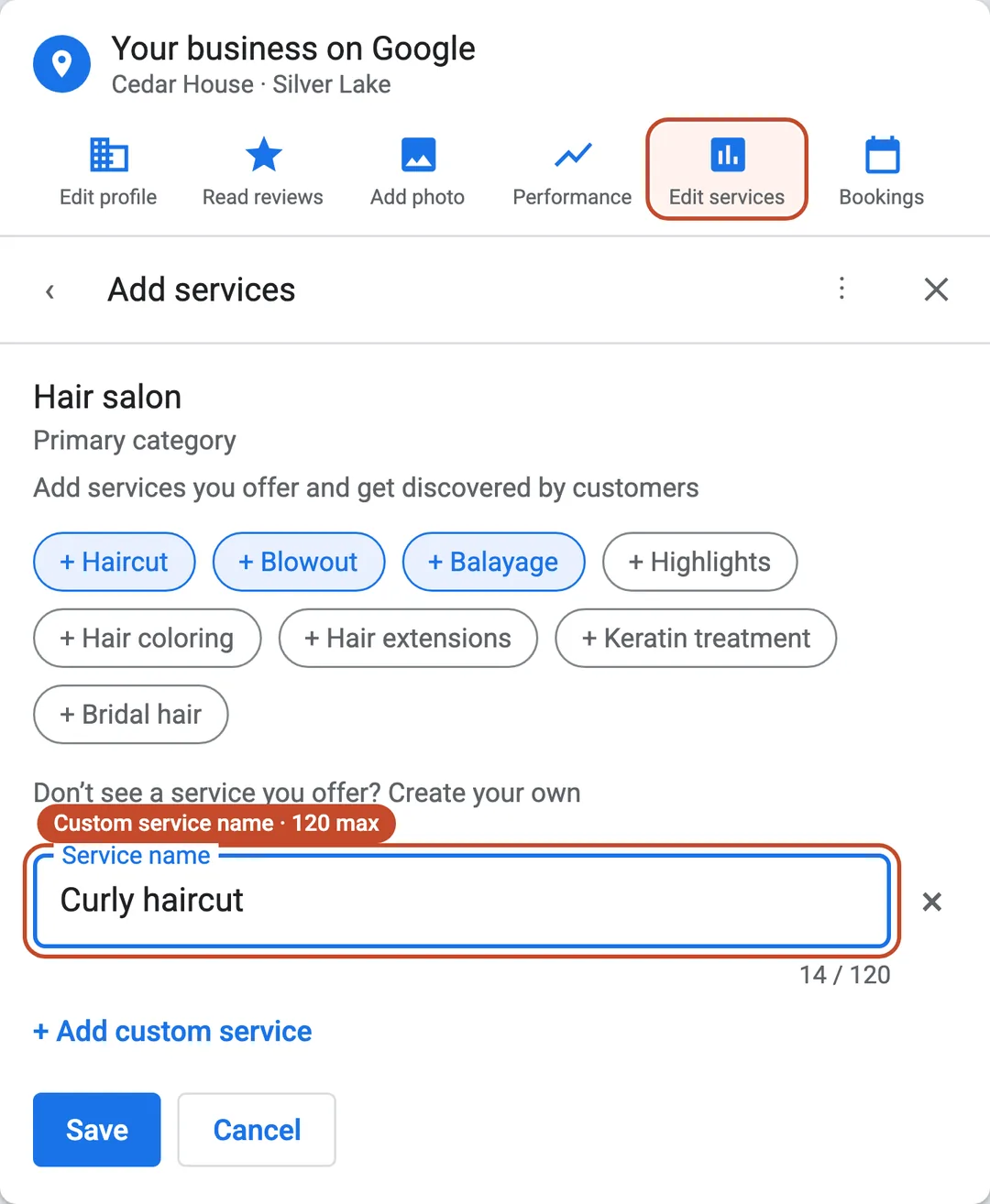
Start with the five to eight services that drive the appointments you most want. Use plain, specific names and only list services you truly offer.
- Haircut
- Curly haircut
- Blowout
- Balayage
- Highlights
- Hair color
- Color correction
- Keratin treatment
- Scalp treatment
- Hair extensions
- Bridal hair
Google lets you add a price and short description to services. Use them when they help a new client choose, but keep the service name clean. “Balayage and dimensional color” is clearer than “dimensional transformation.”
Done when: A first-time client can scan the list and recognize the same words they would type into Google or use when asking ChatGPT for a local specialist.
Fix 3: Use this salon description template (3 minutes)
Your description should help a new client decide whether the salon fits. It should name the location, real specialties, and useful difference in natural language. Repeating “best hair salon near me” does not make the description more helpful.
Click path: Sign in to Google Business Profile → Edit profile → next to Description, select the edit icon
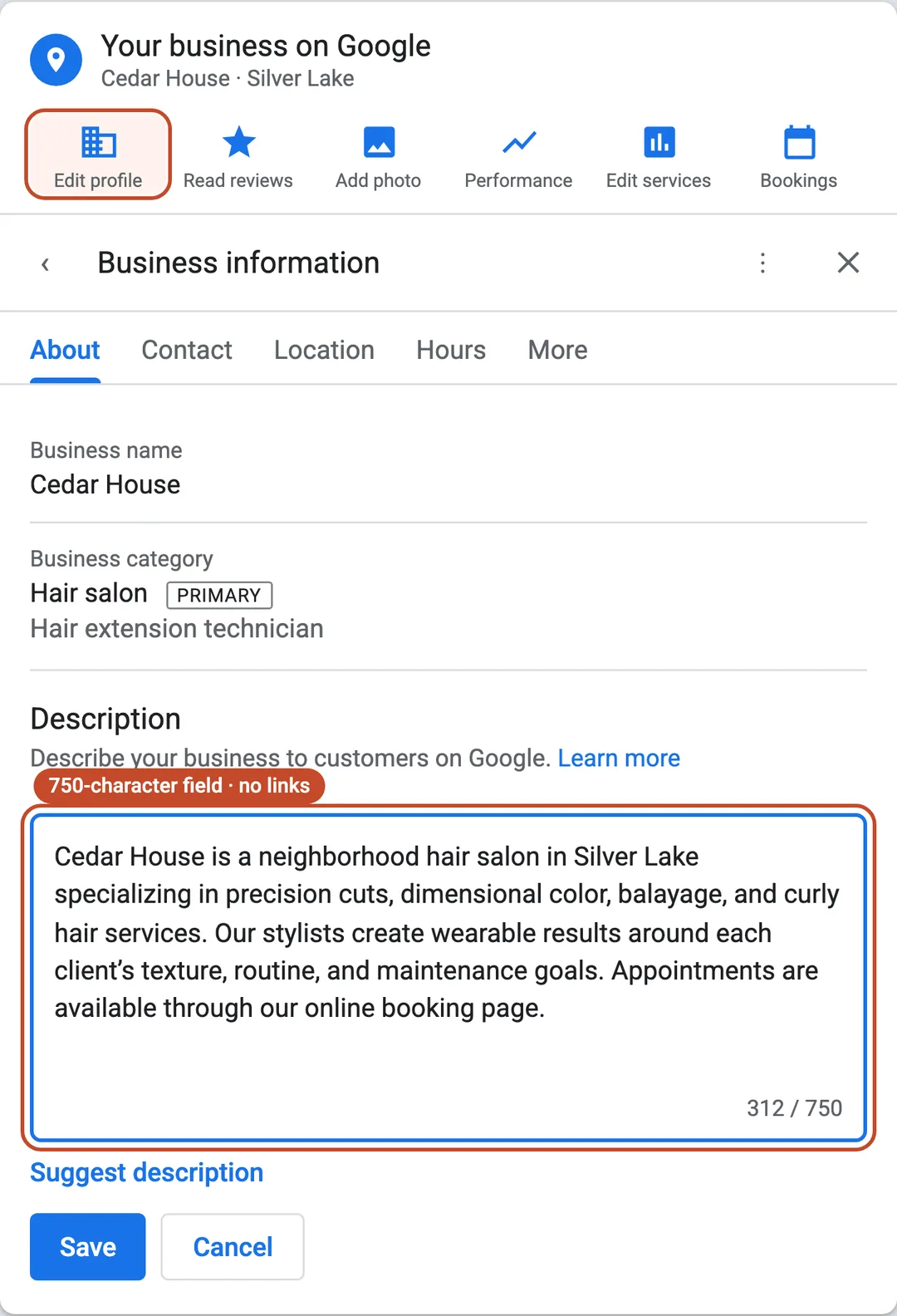
Copy this and replace the brackets:
[Salon name] is a [type of salon or studio] in [neighborhood or city], specializing in [three to five real services]. We’re known for [specific experience or expertise] and work with clients looking for [practical hair goals or audience fit]. Appointments are available through [booking method].
For example:
Cedar House is a neighborhood hair salon in Silver Lake specializing in precision cuts, dimensional color, balayage, and curly hair services. Our stylists create wearable results around each client’s texture, routine, and maintenance goals. Appointments are available through our online booking page.
Google allows useful information about services, products, mission, and history in this field. It does not allow links or copy focused on promotions, prices, or sales.
Done when: The description tells a new client where you are, what you are known for, who you serve, and how appointments work without sounding like a list of search terms.
Fix 4: Make the salon easy to book and verify (2 minutes)
A search result only helps if the client can take the next step. Your booking link should go to the shortest useful path for the right location, stylist, or service menu.
Click path: Sign in to Google Business Profile → on Google Search, select Booking; on Google Maps, select Edit profile → Booking → Add link
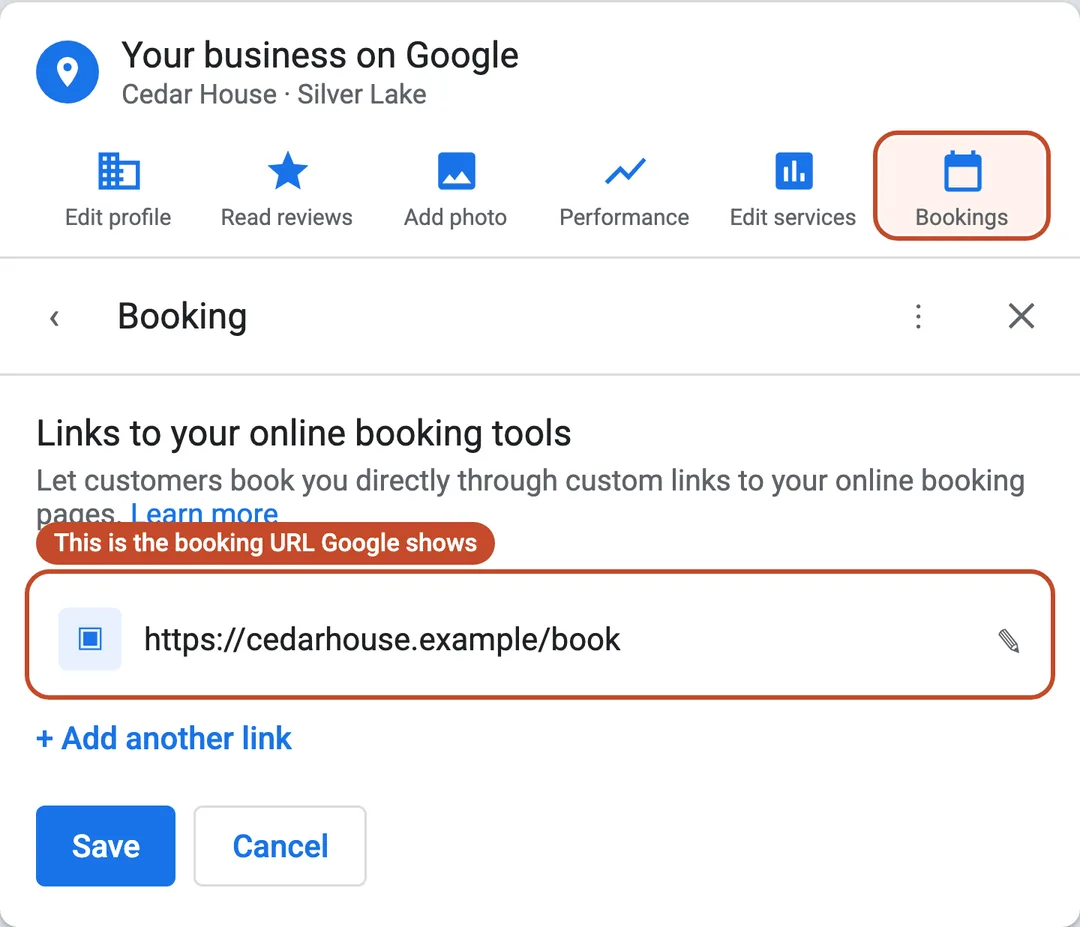
- Link to the correct location, stylist, or service menu instead of a generic homepage when a direct page exists.
- Open the link on your phone while logged out. Confirm that the right location loads and an available service can be selected.
- Confirm that the booking destination belongs to the correct salon location and does not conflict with the booking link on your website.
For ChatGPT to use your page content in summaries and snippets, OpenAI says not to block OAI-SearchBot. Allowing the crawler can support discoverability and citations, but it does not guarantee that a page, salon, or booking link will be surfaced or recommended. Your website provider can check its robots.txt file if needed. Read OpenAI’s current ChatGPT Search guidance.
Done when: A new client can move from a search result to the correct booking screen in one tap.
Fix 5: Make your website hours match Google (5 minutes)
Open your salon website and Google Business Profile side by side. Compare the salon name, address, phone number, website and booking links, and—most importantly—the regular and holiday hours. A client should not have to guess which source is current.
This matters for visibility, but the careful version of the claim is important. Google says businesses with complete and accurate information are more likely to appear in local results, and an inaccurate profile might not appear for relevant nearby searches. Google also says it compiles Business Profile information from several sources, including a business’s official website. It does not say that one website-hours mismatch automatically causes a specific ranking drop. Treat consistency as a high-priority accuracy and trust check—not a guaranteed ranking lever.
Click path: Sign in to Google Business Profile → Edit profile → Hours → next to Hours, select the edit icon → Save
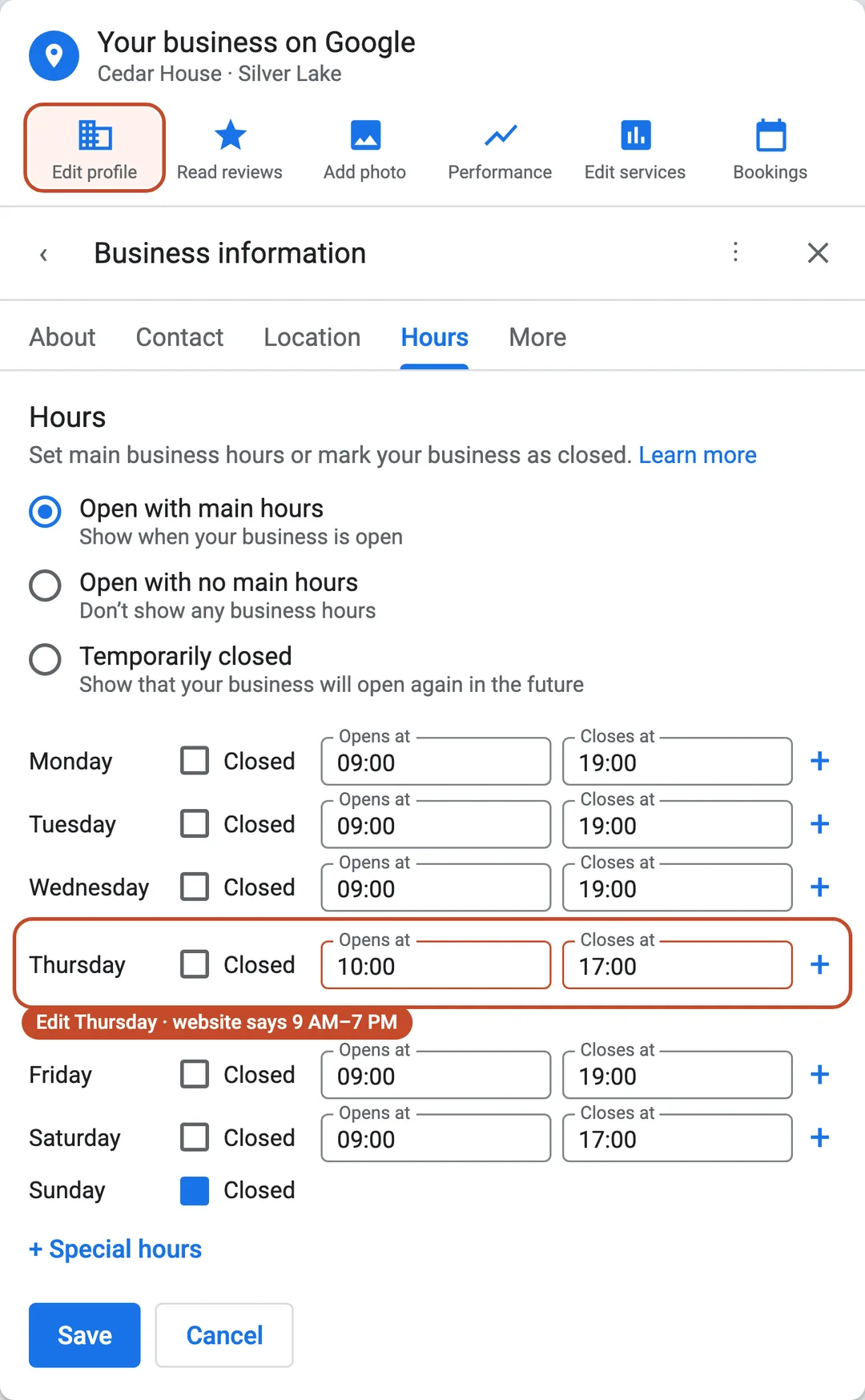
- Compare every day of the week. Watch for different opening times, closing times, split shifts, or days marked closed on only one source.
- Check holiday and temporary hours. Google provides a separate Special hours setting for short-term changes.
- Compare the salon’s name, address, main phone number, website URL, booking link, and core services while both pages are open.
- Correct the outdated source. Do not copy an old mistake from one page to the other merely to make them match.
- Open the website and public Google listing in a logged-out mobile browser to confirm that clients now see the same current information.
Done when: The salon’s current regular and special hours match across its website and public Google listing, and the other core business details do not conflict.
How does local SEO for hair salons actually work?
Google says local results are mainly based on three things: relevance, distance, and prominence.
- Relevance: How well your salon information matches what the person is looking for. Categories, services, and a clear description help here.
- Distance: How far the salon is from the person searching, or from the place named in the search. You cannot edit your way around geography.
- Prominence: How well-known the business appears, including information such as reviews and links from other websites.
You can improve how clearly and credibly the salon is represented. You cannot request or pay Google for a better local ranking, and nobody can guarantee that ChatGPT will recommend a specific salon.
What should you avoid when doing salon SEO?
The fastest way to create a listing problem is to make the business look less truthful in an effort to make it look more optimized.
- Do not add services or cities to the business name unless they are part of the real business name.
- Do not create duplicate profiles for the same business or location.
- Do not add categories or services the salon does not offer.
- Do not buy, gate, or incentivize reviews.
- Do not pay for photo geotagging as a ranking shortcut.
- Do not publish dozens of copied “service + city” pages that provide no distinct value.
Good salon SEO makes the real business easier to understand. It does not invent a different business for the algorithm.
For a restrained consumer handoff after this business guide, share the Guide’s explainers on hair mousse or dry shampoo when those topics fit a client’s question.
Google and Google Business Profile are trademarks of Google LLC. ChatGPT is a trademark of OpenAI. RŌZ is not affiliated with, endorsed by, or sponsored by Google or OpenAI.
Sources and review note
This guide was written from the current public guidance available on August 12, 2026. Search platforms change, so use the links below to confirm a field or policy if your screen looks different.
- Google: Tips to improve your local ranking
- Google: Add or claim your Business Profile
- Google: Verify your business on Google
- Google: Guidelines for representing your business
- Google: Manage services on your Business Profile
- Google: Manage your Business Profile description
- Google: Manage your local business links
- Google: Edit your business hours
- Google: How Google sources Business Profile information
- OpenAI: How ChatGPT Search works
- OpenAI: Publishers and Developers FAQ